GreenHub
Free Carbon Footprint Calculator for Materials: Screen Plastics, Bioplastics & Composites in Minutes
Every material decision is now a carbon decision. A buyer asks for a “low-carbon” version of your part, a brand owner wants a compostable option, a customer needs proof that a switch actually lowers emissions. And yet the honest answer, most of the time, is a shrug: the real numbers live inside expensive Life Cycle Assessments that take weeks to commission.
That gap is where bad decisions get made. A material gets called “greener” because it is bio-based, even though a denser resin can carry a higher footprint per finished part. A compostable claim gets attached to a formulation that contains a non-compostable reinforcement. A team spends three months developing a sample before anyone checks whether it is actually lower-carbon than the plastic it replaces.
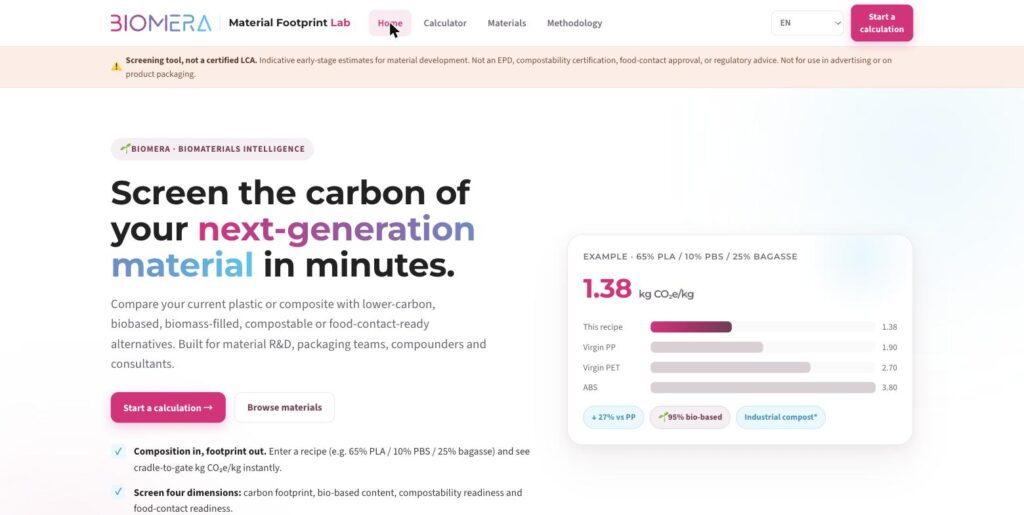
The Biomera Carbon Footprint Calculator was built for that gap. It is a free carbon footprint calculator for materials: type in a formulation and you immediately see its cradle-to-gate footprint, how it stacks up against the plastic you want to replace, and where it sits on bio-based content, compostability and food-contact readiness. It will not give you a certified LCA. It gives you the next best thing this early: a defensible read on which recipes deserve the lab time.
What the carbon footprint calculator for materials does
The calculator estimates the cradle-to-gate carbon footprint of a material formulation: the greenhouse-gas emissions from raw-material extraction through to the finished material leaving the factory gate, expressed in kilograms of CO₂-equivalent per kilogram of material (kg CO₂e/kg).
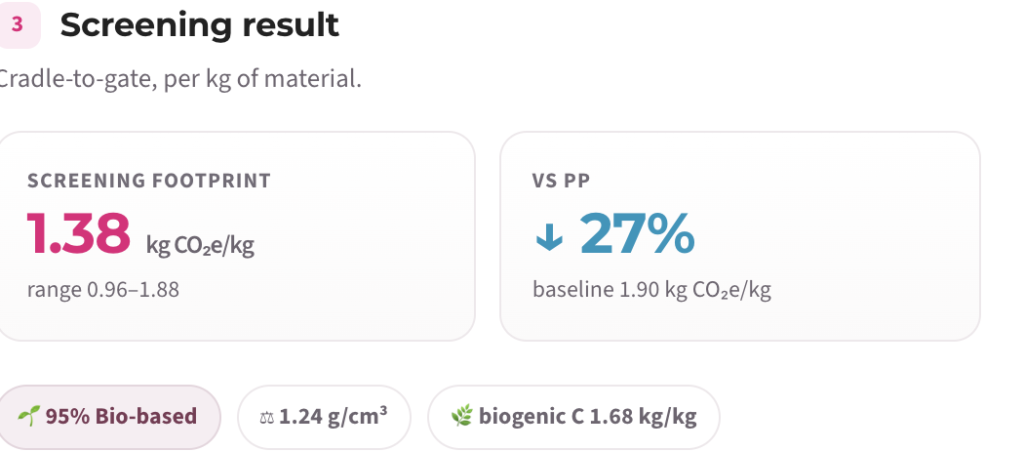
You describe a material the way a compounder actually thinks about it, as a recipe of components and their mass percentages. The tool weights each component’s emission factor by its share, sums them, and returns a single screening number with an uncertainty range. Then it compares that number against a conventional baseline (virgin PP, PET, ABS, or a value you type in), so the number lands with the context you need to act on it.
You can see how each number was built: the method, the factors, and the data-quality grade behind every material. The tool also spells out its own limits on every screen.
Which materials and formulations can you screen?
The calculator covers the full palette a material developer works with, not just one family. You can build and compare formulations across:
- Conventional (fossil) polymers such as PP, PE, PET, PS, ABS and PC, as incumbents or as components.
- Bio-based polymers such as bio-PE, bio-PET, bio-PA and bio-based engineering resins.
- Compostable polyesters such as PLA, PBS, PBAT and PHA.
- Biomass fillers such as bagasse, wheat straw, wood flour and other agricultural residues.
- Natural fibres such as flax, hemp and other plant reinforcements.
- Mineral fillers such as calcium carbonate and talc.
- Glass and technical reinforcements.
- Recycled feedstocks (mechanically recycled grades).
- Additives and masterbatches as minor components.
Because it is composition-based, the tool handles biocomposites and composites natively: a matrix plus fillers plus fibres plus additives is just a recipe. That is what makes it useful for the materials Biomera works with every day, high-performance biocomposites and masterbatches made from upcycled biomass, as well as for benchmarking them against the plastics they are designed to replace.
How the calculation works
The core formula is deliberately simple and fully disclosed:
Material footprint = Σ (component share ÷ 100 × component GWP factor)
Each component carries a global-warming-potential (GWP100) factor in kg CO₂e/kg, drawn from a curated screening dataset. The tool multiplies each factor by that component’s mass fraction and adds them together. Around the central value it also carries a low-to-high range, so a formulation built on rougher data visibly shows more uncertainty than one built on supplier declarations.
That is the whole Quick Screen. The Expert view then layers on the parts of a footprint that depend on how and where a material is made:
- Processing energy, using the electricity-grid carbon intensity of the production country (producing in a low-carbon grid such as France is very different from a coal-heavy grid).
- Transport, by distance and mode (truck, rail, ship, air).
- A scrap uplift, because rejected material carries embedded emissions.
- End-of-life indication, reported strictly separately and never merged into the cradle-to-gate figure.
Why biogenic carbon is reported separately
The core formula is deliberately simple and fully disclosed:
Material footprint = Σ (component share ÷ 100 × component GWP factor)
Each component carries a global-warming-potential (GWP100) factor in kg CO₂e/kg, drawn from a curated screening dataset. The tool multiplies each factor by that component’s mass fraction and adds them together. Around the central value it also carries a low-to-high range, so a formulation built on rougher data visibly shows more uncertainty than one built on supplier declarations.
That is the whole Quick Screen. The Expert view then layers on the parts of a footprint that depend on how and where a material is made:
- Processing energy, using the electricity-grid carbon intensity of the production country (producing in a low-carbon grid such as France is very different from a coal-heavy grid).
- Transport, by distance and mode (truck, rail, ship, air).
- A scrap uplift, because rejected material carries embedded emissions.
- End-of-life indication, reported strictly separately and never merged into the cradle-to-gate figure.
Two ways to use it: Quick Screen and Expert
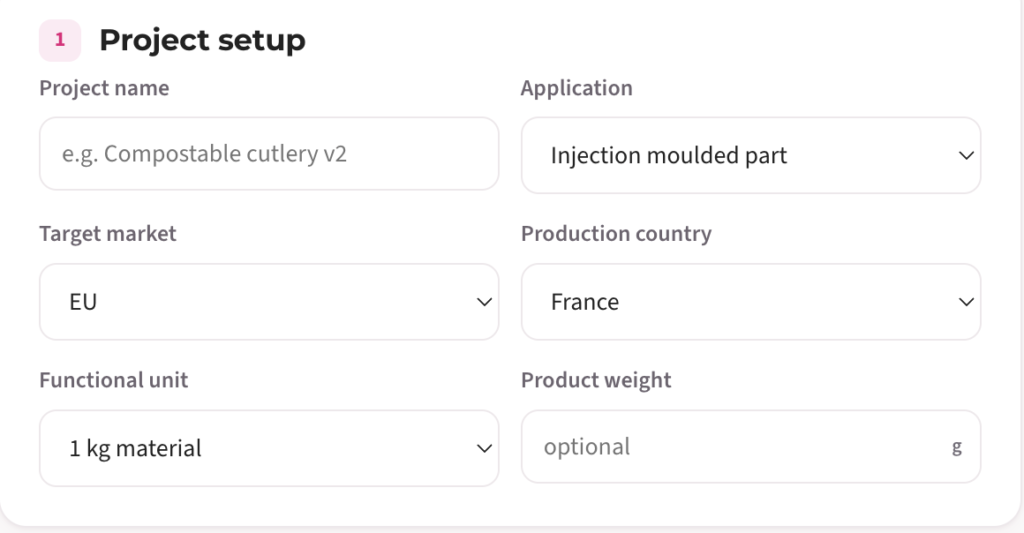
Quick Screen is open to everyone, with no login. Enter a recipe, pick a baseline, read the result. It is built for a first estimate: fast enough to run ten formulation ideas before lunch and keep the two worth developing.
Expert is an access-code view for material developers, used by the Biomera team and authorised partners. It adds project setup, per-component data-quality grades and overrides, processing energy by country grid, transport legs, end-of-life scenarios, compostability and food-contact readiness rules, improvement suggestions and a printable PDF report.
Both views run on the same transparent engine and the same dataset. Expert simply exposes more of the levers.
What the results tell you
A screening result is more than one number. For any formulation you get:
- The cradle-to-gate footprint in kg CO₂e/kg, with an uncertainty range.
- A comparison against your baseline, shown as a percentage up or down versus the incumbent plastic.
- A per-equal-volume comparison, because parts are made by volume, not by mass. A denser material needs more kilograms to fill the same part, so a recipe that wins per kilogram can draw level per part. The tool shows both, so you are never misled by density.
- Bio-based and fossil-free content as a percentage.
- Compostability readiness (screening, not certification): a single non-compostable component blocks a compostable claim, and the tool says so.
- Food-contact readiness (screening, not approval): a flag on migration and documentation risk.
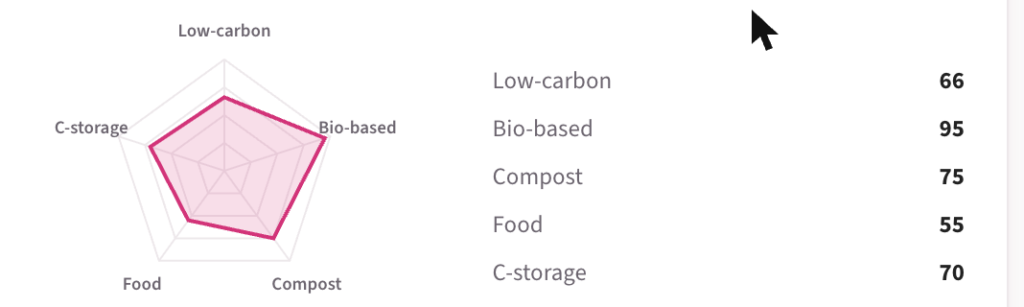
- A sustainability profile radar across five axes, all scored so that “more is better”: low-carbon, bio-based, compostability, food-contact and carbon storage.
A worked example
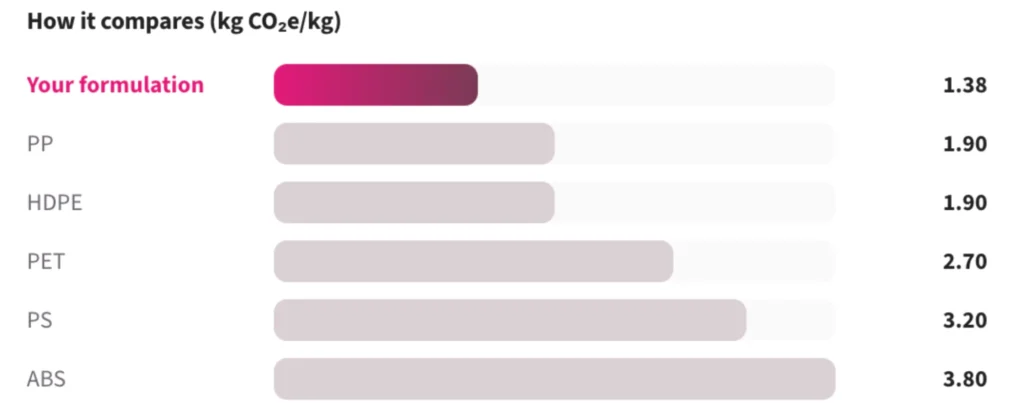
Take a compostable-cutlery style formulation and screen it against three common incumbents. The tool returns something like this:
| Material | Carbon footprint (kg CO₂e/kg) | vs this recipe |
|---|---|---|
| 65% PLA / 10% PBS / 25% bagasse | 1.38 | baseline recipe |
| Virgin PP | 1.90 | 27% higher |
| Virgin PET | 2.70 | 49% higher |
| ABS | 3.80 | 64% higher |
At a glance, the biocomposite recipe is about 27% lower-carbon per kilogram than virgin PP. The Expert view would then add processing and transport, check the per-part comparison by density, and flag that the recipe is on track for industrial-compost readiness as long as no non-compostable additive is introduced. That is a call you can make in an afternoon, instead of waiting a month for a full LCA.
(Figures are indicative screening values for illustration.)
Screening tool, not a certified LCA
It is worth being blunt here, because this is what keeps the tool honest. The calculator is a screening instrument: fast, directional estimates for internal material development. It is not:
- a certified Life Cycle Assessment (ISO 14040/14044),
- an Environmental Product Declaration (EN 15804),
- a compostability certification (EN 13432 or home-compost schemes, which require testing of the finished article),
- a food-contact approval (EU 10/2011, FDA, which require supplier declarations and migration testing).
Screening results are for choosing which options to develop and test. They must not be used in advertising, on packaging, or in any public environmental claim without a full, verified LCA. The tool is built to make that boundary obvious rather than to blur it, which is precisely what makes its numbers usable inside a serious development process.
Where the data comes from
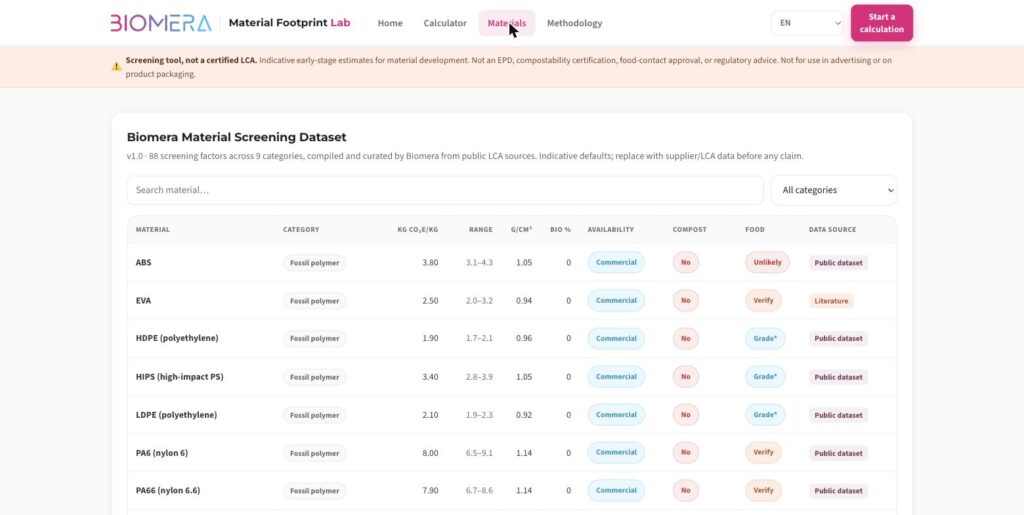
Factors are compiled from publicly available sources: PlasticsEurope eco-profiles, supplier EPDs, the Idemat dataset (TU Delft), nova-Institut fibre studies and peer-reviewed literature. No licensed or restricted database values (such as ecoinvent or Sphera) are redistributed. Every material carries a data-quality grade, from supplier-verified down to rough estimate, so you always know how much weight a given number can bear.
Who it is for
- Material developers and compounders screening formulation ideas before lab work.
- Packaging teams and brand owners checking whether a proposed switch actually lowers carbon.
- Sustainability and R&D leads who need a fast, transparent first pass before commissioning a full LCA.
- Consultants building an early business case for a lower-carbon material.
Frequently asked questions
Is the carbon footprint calculator really free?
Yes. The Quick Screen is completely free and needs no login or account. You can screen and compare formulations as often as you like. The Expert view is access-code protected for the Biomera team and authorised partners.
What is a cradle-to-gate carbon footprint?
It is the greenhouse-gas emissions from raw-material extraction up to the point the finished material leaves the factory gate, expressed in kg CO₂e/kg. It excludes the use phase and end-of-life, which is the right scope for comparing materials against each other at the development stage.
Which materials can I calculate?
Fossil polymers (PP, PE, PET, PS, ABS, PC), bio-based polymers, compostable polyesters (PLA, PBS, PBAT, PHA), biomass fillers (bagasse, wheat straw, wood flour), natural fibres (flax, hemp), mineral fillers, glass reinforcements, recycled grades and additives. Because it is composition-based, it handles composites and biocomposites directly.
How accurate is it, and is it a certified LCA?
It is a screening tool, not a certified LCA. It gives directional, transparent estimates with an uncertainty range and a data-quality grade on every factor. Use it to decide which options to develop and test, then commission a full ISO 14040/14044 LCA before making any public claim.
Can I compare a bioplastic to a conventional plastic, like PLA versus PP?
Yes, that is the core use case. Enter your alternative formulation, choose the incumbent plastic as the baseline, and the tool shows the difference as a percentage, both per kilogram and per equal volume.
Does it show compostability and food-contact suitability?
It shows readiness screening for both, not certification or approval. It flags, for example, when a non-compostable component blocks a compostable claim, or when a formulation needs supplier documentation for food contact. Final claims always require testing of the finished article.
Can a material be carbon-negative?
Biogenic carbon (the CO₂ a plant absorbs as it grows) can be stored in a bio-based material, and the tool reports that stored carbon separately as its own property. It does not net it against the footprint by default, because a genuine carbon-negative claim requires a full, verified LCA of the specific product.
Does the production country change the result?
In the Expert view, yes. Processing energy is calculated using the electricity-grid carbon intensity of the production country, so making the same material in a low-carbon grid versus a coal-heavy grid changes the footprint.
Can I use the results in marketing or on packaging?
No. Screening results are for internal development decisions only. Any public environmental claim needs a full, verified LCA, supplier declarations and, where relevant, compostability and migration testing.